

At HighRes®, we are committed to innovation as a core brand promise. This quarterly innovation update details the pace of our innovation as it relates to our digital portfolio.
This second edition covers Q2 2026 and spans a landmark partnership with NVIDIA, significant advances across Cellario OS™ V1.16 and V1.17, the continued development of our AI-powered beta products, and an expanding body of published use cases and integrations that demonstrate the breadth of what Cellario OS is enabling across life science organizations today.
Key Takeaways
|
Cellario OS and NVIDIA: The Open Execution Layer for AI Scientists
On June 23, 2026, HighRes announced the formal positioning of Cellario OS as the open execution layer for AI Scientists, beginning with an integration with NVIDIA BioNeMo Agent Toolkit at the BIO International Convention. Read the full announcement here.
Agentic life sciences workflows can generate and evaluate experiments at machine speed, but a protocol remains a hypothesis until something runs it correctly and returns trustworthy data. As AI Scientists accelerate hypothesis generation, the constraint shifts to execution. Cellario OS and Cellario Lab Assistant sit between the AI Scientist and the bench, translating scientific intent into physically executed experiments and returning structured, provenance-rich data the model can act on.
A central part of this is capability discovery: an AI Scientist can query the lab through Cellario Lab Assistant for the instruments, assays, methods, and constraints available on the floor. The lab returns a machine-readable capability model so experiments are designed against real-world conditions rather than assumptions. Generated protocols are simulated before any hardware moves, and Cellario OS then orchestrates execution deterministically with full traceability.
NVIDIA Technology Across the Cellario Platform
NVIDIA BioNeMo Agent Toolkit extends agent-callable AI skills into the physical lab. Cellario OS provides the execution layer that runs experiments and returns results the model can act on (Fig. 1).
We’ve shown already how Lab designer models can be passed through NVIDIA Omniverse to render lab layouts in a physically accurate, photorealistic environment, accessible to both human planners and AI planning tools. See the Lab Designer section for more.
NVIDIA Cosmos powers physical AI capabilities in Perception™, enabling real-time detection of instrument and workflow anomalies, and supporting autonomous recovery actions.
"An AI Scientist can design thousands of experiments, but none of them are real until the lab runs one and returns data you can trust."

Ira Hoffman
CEO at HighRes
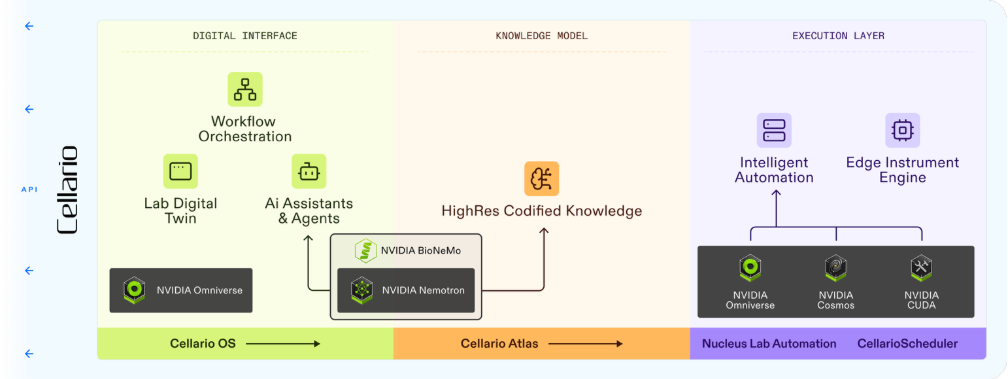
Figure 1. Cellario OS as the open execution layer, the relationship between the NVIDIA and Cellario Stacks for the lab.
Cellario Lab Assistant Skills Now Available
A significant development for Cellario Lab Assistant this quarter is the introduction of the Skills architecture - a structured, extensible framework of discrete capabilities that Lab Assistant can deploy in response to natural language instructions. Skills are the building blocks that allow Lab Assistant to take meaningful, context-appropriate action on behalf of the scientist.
Skills are designed to be model-agnostic, meaning they are not tied to any single underlying AI model, and user-buildable. Teams with specific workflows can create and extend Skills to match their own laboratory environment and scientific processes. This is an important design principle: as the AI landscape evolves, Lab Assistant evolves with it, and organizations retain control over the capabilities deployed in their environments.
Skills in Action - Error Handling and Troubleshooting
Error handling and troubleshooting is an example of a Skill in action, and it illustrates exactly why this model is powerful (Video 1). When an instrument encounters an issue mid-run, Lab Assistant deploys its error troubleshooting Skill: it interprets the error state, assesses the context of the running workflow, and guides the operator through recovery steps in plain language. Instructions are step-by-step, appropriate to the specific error type and instrument.
For any co-piloting tool to be genuinely useful in a complex laboratory environment, it must be able to handle the unexpected, not just the plan. The ability to diagnose and guide recovery in real time, without requiring operators to consult documentation or call a specialist, is a core value of the Skills approach. It reduces downtime, lowers the expertise required for independent operation, and builds confidence in the system.
Video 1. Cellario Lab Assistant deploying the error troubleshooting Skill, guiding an operator through instrument recovery using plain language instructions.
Current Lab Assistant Skills
Beyond error recovery, Skills in early access include:
- Fleet optimization for multiple systems with dockable carts and reconfigurable instruments to find the best setup for a given campaign.
- Scheduler log interpretation to compress and categorize run log data.
- Quick scheduler protocol modification for instrument swaps and small edits with minimal protocol impact.
- Feedback support for prompt to protocol generation process.
- Cellario system health scorecard generation
Watch Lab Assistant in action, building an orchestration workflow including agent-to-agent Opentrons method building, in our joint webinar here.
Cellario Lab Designer V0.5 and NVIDIA Omniverse
Cellario Lab Designer gives teams a 3D workspace to plan and validate laboratory layouts before a single piece of equipment is installed, connecting physical layout with operational logic so teams can identify conflicts, validate throughput, and align on design decisions months before deployment.
What's New in V0.5
- Expanded component library. Over 50 new instruments and devices have been added to the library, with approximately 75 existing components updated (Fig. 2). Labs can now build richer, more accurate representations of their planned environments, including a broader range of third-party equipment.
- NVIDIA Omniverse. Lab Designer has been demonstrated to connect to NVIDIA Omniverse, allowing layouts to be rendered in a physically accurate, photorealistic environment. This is directly relevant to AI planning workflows, where an AI Scientist benefits from operating against a grounded model of the real lab rather than an abstract schema. A working example is referenced in the NVIDIA partnership announcement; a full visual showcase is coming soon as the integration matures.
- Significantly improved visual quality. New rendering techniques produce much better contrast and visual separation between adjacent components, addressing a long-standing challenge where systems of similar-colored instruments could look flat or hard to read (Fig. 2). The result is scenes that are noticeably clearer and more useful for planning and communication.
- Ease of use improvements. New property fields for tracking and revision control, hover tooltips on components with application guidance, a custom placeholder for instruments not yet in the library, tag-based search, and fine-grained rotation controls all improve the day-to-day planning experience.

Figure 2. Cellario Lab Designer V0.5 showing improved visual quality and the expanded component library.
Early Access Beta Program in Full Flight
The Early Access Beta Program is now in active operation, with select partner organizations using Cellario Lab Assistant™, Cellario Lab Designer™, and Cellario Perception™ in real laboratory environments. Feedback from beta partners is directly shaping each product ahead of general availability.
Lab Assistant brings conversational AI to the Cellario platform - scientists interact with their lab in natural language, from workflow creation to real-time error recovery. Lab Designer accelerates lab planning and validation in a 3D environment, compressing months of pre-deployment work into days. Perception improves automation reliability through real-time machine vision, enabling systems to detect and respond to unexpected conditions autonomously.
We are continuing to recruit new beta partners across all three products. If your organization is interested in early access and the opportunity to shape what these tools become ahead of general release, we welcome the conversation.
→ Express interest in the Early Access Beta Program
Cellario Scheduler 4.5 Now Released
In our Q1 update we introduced Cellario Scheduler 4.5 as an upcoming capability. It is now fully released and we want to highlight it again because it represents a genuine inflection point for how laboratory protocols are designed and optimized.
The headline capability is a set of RESTful API endpoints that enable the programmatic creation, modification, and optimization of laboratory protocols through automated agents and intelligent systems (Fig. 3). These type-safe APIs support the full spectrum of protocol design, from creating complex multi-threaded workflows to dynamically adjusting parameters, resources, and timing constraints based on real-time experimental feedback.
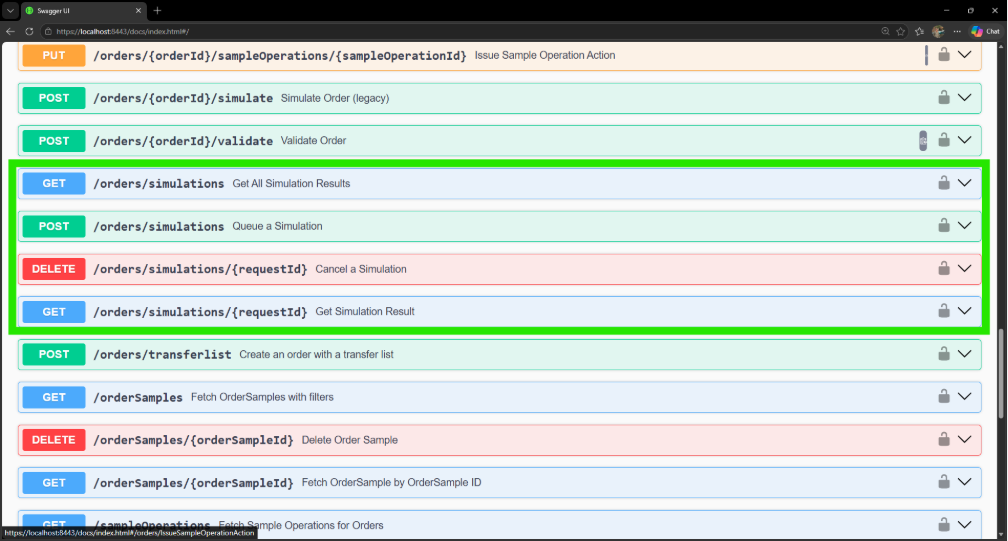
Figure 3. Cellario Scheduler 4.5 screenshot of the new Simulation API endpoint to queue up a simulation.
This moves protocol development from static, manually designed workflows to dynamic, self-optimizing processes. Research teams can deploy agents that monitor experimental results, identify bottlenecks, and automatically generate protocol variants for testing, all while maintaining full audit trails. For laboratories running Design-Make-Test-Analyze (DMTA) cycles, this is the infrastructure that allows the loop to close programmatically rather than manually.
Looking ahead, Cellario Scheduler 4.5 will also unlock additional functionality within Cellario Lab Assistant in the coming weeks, specifically, simulation and protocol editing capabilities that allow scientists to model and refine scheduled protocols before committing them to execution. This is the next meaningful step in connecting the AI interface directly to the scheduling layer.
Download the full Cellario Scheduler 4.5 release notes here.
Cellario OS Updates
Two releases of Cellario OS have shipped since the Q1 update: V1.16 (April 16, 2026) and V1.17 (June 10, 2026), with a V1.17.1 patch following on July 12. Together they represent significant advances in workflow capability, developer tooling, and the breadth of connected extensions.
Workflows
One of the largest areas of focus is broadening the capability set of an orchestration workflow. A workflow is a digitized representation of all of the steps required to complete an experiment. It comprises steps such as protocol – to call upon a scheduler run; guided tasks for operator interventions; direct device operations to directly control instruments; scripts and flow and logic control with decisions and loops. An example workflow can be seen in Figure 4.
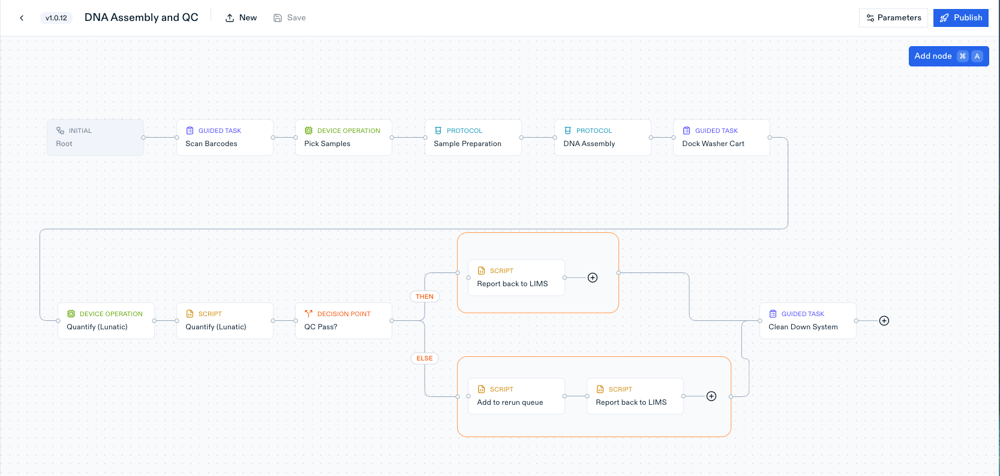
Figure 4. An example DNA Assembly and quality assessment workflow, showing a complete orchestrated workflow.
Workflow Calendaring (V1.17)
Scheduling workflows to run at a future time has long been possible through Cellario Scheduler. V1.17 extends this capability across the full workflow experience in Cellario OS, with a block-calendar interface, conflict detection, reschedule support, and cancel-with-reason semantics (Fig. 5). Labs can now plan and commit workflows in advance, coordinate resources across teams, and manage capacity deliberately, without requiring all orders to be started in real time.
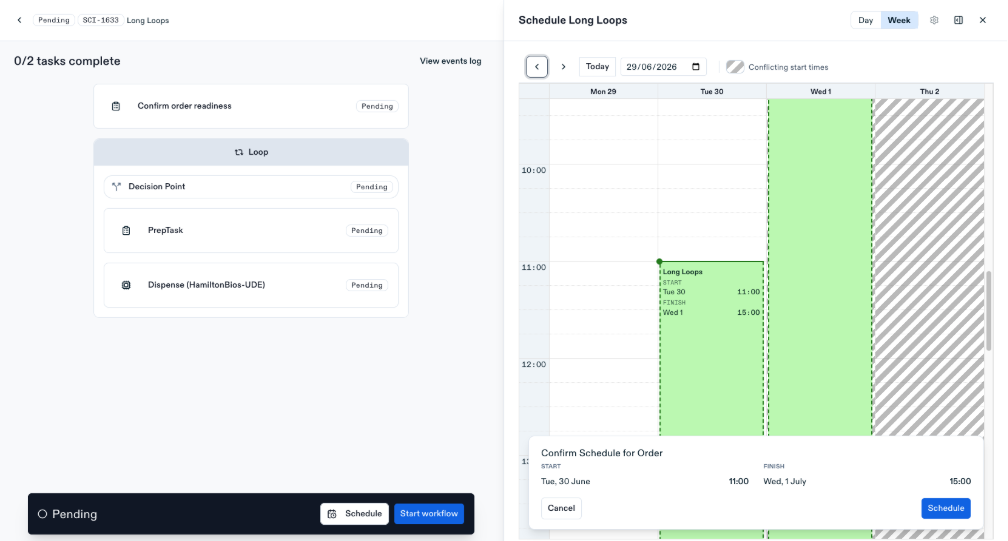
Figure 5. Workflow calendaring in Cellario OS V1.17 scheduling pending workflow orders across a calendar view with conflict detection.
Python Scripting and Developer Experience (V1.17)
Users can now author workflow scripts in Python, a significant expansion of the scripting environment that opens the platform to a much wider range of developers and technically capable users (Fig. 6). Scripts can be edited directly in-browser through a new web editor, or via a dedicated VSCode extension for teams who prefer a local development environment. Error messages from remote scripts are surfaced clearly in the OS UI, reducing debugging overhead substantially. Together, these changes make Cellario OS a meaningfully more open and developer-friendly platform.
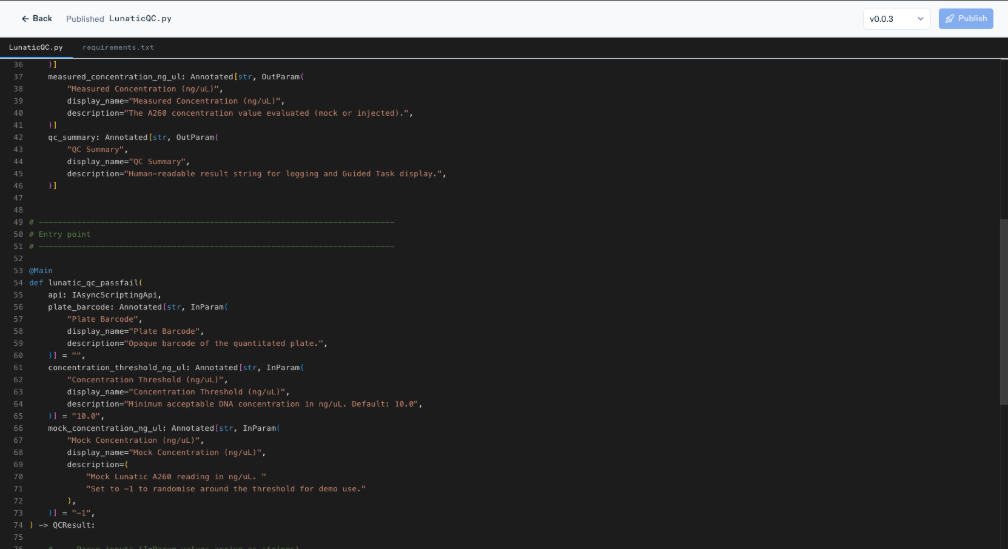
Figure 6. Python workflow scripting in Cellario OS V1.17 in-browser editor showing a workflow script with real-time error feedback.
Parallel Execution of Workflow Steps (V1.17)
Workflow steps can now run in parallel branches within a single workflow. A new container experience, compiler validators, and runtime state management allow concurrent execution paths to be modelled and run through the orchestration layer, enabling genuinely parallel laboratory operations rather than forcing sequential execution where it is not required.
Run Recovery for Workflows (V1.17)
Cellario OS now supports recovering in-progress workflow runs after interruption. When a run is disrupted by a network event, device error, or system restart, the orchestration layer can resume from where it stopped rather than requiring a full manual restart. This meaningfully improves reliability for long-duration or complex workflows.
Workflows Advances (V1.16)
V1.16 established the Latest Workflows foundation: tighter integration between Cellario OS and Cellario Scheduler 4.5 through a cloud scheduler deployment model and scripting environment infrastructure. This is the technical foundation that the advanced V1.17 workflow capabilities are built on.
Connectors and Extensions
V1.16 and V1.17 have both advanced the depth of Cellario OS connector support. The following extensions have been updated or added in these releases, for a broader view of the platform's connector ecosystem, see the Growing Network of Connectors section below.
Limfinity via Extension Service (V1.17)
Full Limfinity biobanking LIMS integration is now delivered through the Cellario OS Extension Service, consolidating the integration into the standardized extension framework and simplifying deployment and maintenance for organizations using Limfinity as their sample management platform.
Mosaic by Cenevo and Scigilian (V1.16 and V1.17)
The Mosaic by Cenevo and Scigilian extensions have been updated across both releases, including a backport of the extensions core to Scigilian and dedicated development, QA, and demonstration environments for Mosaic. These updates build on the dose-response capabilities delivered in V1.15, deepening the integration with the scientific software tools used in drug discovery and sample management workflows.
Operator Experience
Hands-Free Guided Tasks and Inventory Position Guidance (V1.17)
Operators can now navigate guided tasks hands-free, with auto-scroll that follows workflow progress, improved barcode scanning, and focus-follows-progress behavior. Inventory position guidance has also been added, directing users to specific labware positions within the step-by-step flow. Both changes make Cellario OS more practical in environments where operators have their hands occupied with physical lab work.
A Growing Network of Connectors
With over 500 instrument and device drivers, one of the largest libraries of its kind in the industry, plus a growing set of deep software integrations, Cellario OS increasingly serves as the connective layer between the physical laboratory and the digital ecosystem around it. The integrations highlighted in the Cellario OS V1.16 and V1.17 section above are part of this broader network. For a deeper look at how Cellario OS functions as the integration layer that brings these connections together, see the Cellario OS as an Integration Layer section below.
Benchling - The Lab-to-Insight Pipeline
The Benchling integration connects Cellario OS directly to Benchling's ELN. Scientists initiate runs from within Benchling, Cellario OS executes the workflow on the robotic system, and structured results flow back into the notebook automatically, eliminating manual data handling between bench and analysis. Watch the full demo and our recent webinar with the Benchling team.
Opentrons - Agent-to-Agent Automation
HighRes and Opentrons demonstrated the industry's first agent-to-agent laboratory workflow. Cellario Lab Assistant communicating directly with the Opentrons AI via MCP server to generate protocols on behalf of another AI system. The demonstration covered a complete qPCR workflow from natural language intent to analyzed results. Watch the full demo in our recent webinar with the Opentrons team.
Mosaic by Cenevo - Sample Logistics
Mosaic by Cenevo is one of Cellario OS's most deeply integrated connector partners, with the integration enabling end-to-end dose-response and compound management workflows. As updated in V1.17, Mosaic now has dedicated development and QA environments within the OS extension framework, supporting more robust deployment and ongoing development of the integration. Watch the full demo in our recent webinar with the Cenevo team.
Scigilian - Scientific Data Integration
The Scigilian extension has been updated and brought into the standardized extension architecture, ensuring it benefits from the same reliability improvements and SDK tooling as other Cellario OS connectors.
Limfinity - Biobanking and Sample Management
Full Limfinity integration, delivered via the Cellario OS Extension Service in V1.17, gives organizations using Limfinity for biobanking and sample management a native, standardized path to connect their workflows to Cellario OS execution.
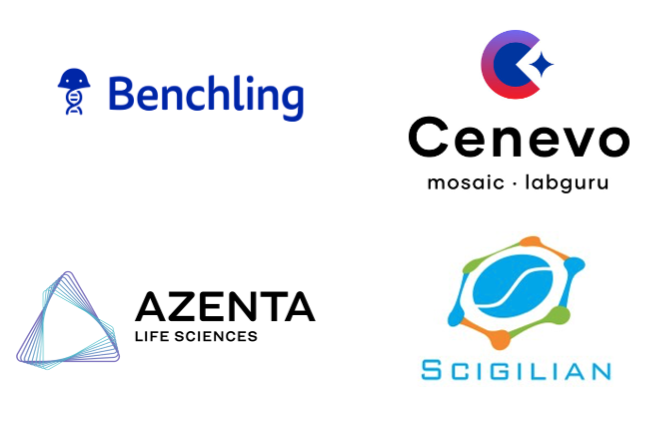
Figure 7. The Cellario OS connector ecosystem spanning ELNs, LIMS, sample management platforms, informatics tools, and AI Scientist platforms, underpinned by 500+ instrument drivers.
An Expanding Portfolio of Cellario OS Use Cases
As the Cellario OS customer base grows and deployments deepen, a richer picture is emerging of the patterns in which the platform is being used. Three are now particularly well-documented.
Core Drug Discovery Facility Orchestration
The most established use case is Cellario OS as the orchestration layer for an integrated drug discovery automation facility, coordinating robotic systems, scheduling instruments, managing sample logistics, and returning operational data to the informatics infrastructure. Pfizer's High-Throughput Screening group shared their experience at SLAS2026, commissioning three Nucleus® automation systems within a newly renovated HTS lab and running cell-based, biochemical, and automated imaging workflows in parallel. Read the full story.
Cellario OS as an Integration Layer
In many modern deployments, Cellario OS does not surface as the primary user interface at all. Instead, it runs as the invisible backbone - the driver layer that connects instruments, coordinates workflows, captures execution data, and exposes everything through a single unified API (Fig. 8). Digital applications, ELNs, and AI tools interact with the physical lab through that API without end users ever opening the Cellario interface.
This headless deployment model addresses a fundamental challenge: while the digital layer of the modern lab has become increasingly sophisticated, the physical lab remains fragmented. Instruments speak different languages, automation systems operate in silos, and translating digital intent into physical execution still requires complex, brittle integrations. Cellario OS resolves this by acting as the translation engine - a standardized execution layer that sits beneath whatever digital ecosystem an organization has already built.
The Cellario OS API is fully Swagger-documented, and the platform ships with SDK tooling that makes building on top of it accessible to development teams across the organization. Real-world integrations with Benchling, Genedata, Scigilian, Mosaic by Cenevo, and Limfinity, plus numerous custom-built internal systems, demonstrate the model in production. Read the full integration layer blog.

Figure 8. Cellario OS as the universal operating layer, bridging the physical laboratory and the digital ecosystem through a single API.
Sample Management
Sample logistics is a core application area for Cellario OS, particularly in drug discovery environments where dose-response experiments and compound management are foundational. Through the Mosaic by Cenevo integration, Cellario OS tracks sample location, consumption, and transformation in real time as samples move through automated and manual workflows - maintaining a live chain of custody without requiring separate integrations to each individual instrument or storage system.
Get in Touch
For a demonstration of any of the capabilities in this update, or to learn more about the Early Access Beta Program, please get in touch.